Use Products and Services on QBO Expense Transactions
Written By Jared Smith
You can assign Products and Services (Items) to QuickBooks Online (QBO) expense transactions in Uncat, which will turn the expense from an Account-based expense to an Item-based expense, including a Quantity value, while still being able to choose a regular category/account when needed.
Who this applies to
QBO clients
This feature is not currently supported for QuickBooks Desktop or Xero.
Teams that need item-based coding (for job costing, products/services workflows, etc.)
How to enable it
Go to Client Settings → Transactions.
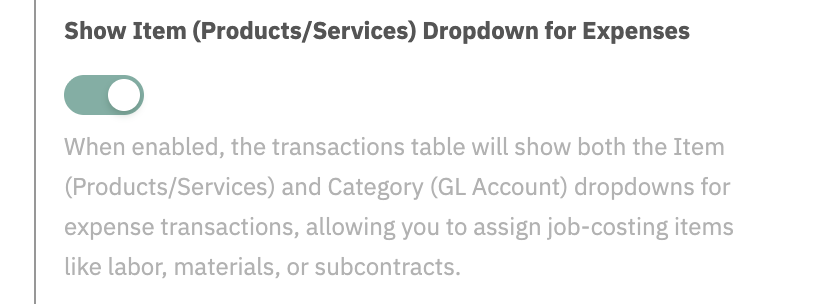
Enable Show Item (Products/Services) Dropdown for Expenses.
What changes in the transaction table
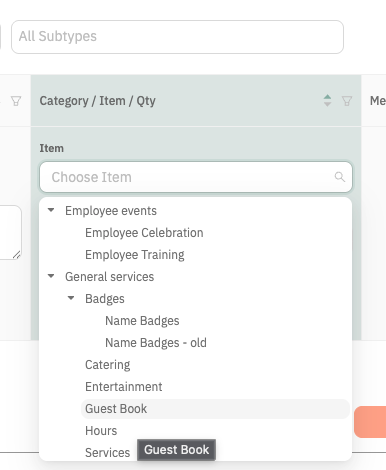
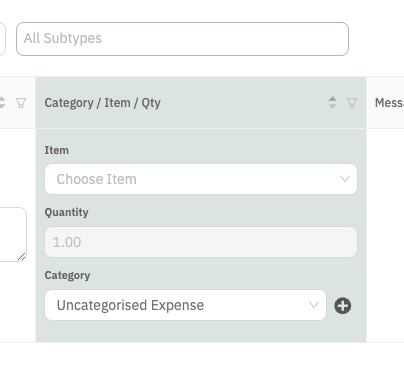
You will see separate sections for Item, Quantity, and Category.
You can select an item and set quantity on expense rows.
You can still switch back to category/account-based coding when needed.
Syncing with QuickBooks Online
When you choose an item (product or service) for an expense in Uncat, Uncat will sync these changes to QuickBooks Online, moving the information for the expense from the “Category Details” to the “Item Details” section and carrying over any fields from Uncat as well as existing values from the expense in QBO.
Troubleshooting checklist
Confirm the client setting toggle is enabled.
Confirm an product / service is selected on the row.
Confirm quantity is greater than zero.
If QBO result differs, check the selected item's linked accounts in QBO.